
The short answer
An AI homework helper is an app that takes a question, whether photographed, typed, or uploaded, and produces the answer with the reasoning, the way a tutor would explain it. Modern helpers like Socratic Solve combine two kinds of AI: vision models that read the question off the page (printed or handwritten), and language models that solve it and write out each step.
The practical effect: the 20 minutes you used to spend hunting for a similar worked example now takes one photo. The catch is that the tool is only as useful as the way you use it. Read the steps, check them, and redo the problem yourself, and it works like a patient tutor. Copy the last line, and you learn nothing and risk breaking your school's rules.
Put an AI tutor in your pocket
Socratic Solve is free to download. Scan, understand, and move on to the next question.


How an AI homework helper works
Almost every AI homework helper runs the same three stages. Knowing them tells you exactly where errors can creep in.
1. It reads the question
When you photograph a worksheet, a vision model (a more capable cousin of classic OCR, or optical character recognition) turns the image into text and math. It has to tell a handwritten 5 from an S, a multiplication sign from an x, and a small raised 2 (an exponent) from a normal 2 sitting next to a variable. If you type the question instead, this stage is skipped, which is why typing is the safest fallback when a photo is blurry.
2. It works out a solution
A language model then reasons through the problem: it identifies the topic (a quadratic, a stoichiometry question, a cause of the First World War), picks a method, and carries it through. This is the stage that makes AI helpers different from older answer databases. They generate a solution to your exact question instead of matching it to a similar one someone posted years ago.
3. It explains the steps
Finally, the solution is written out as numbered steps, ideally with proper math notation (fractions stacked, exponents raised, matrices in brackets) so it looks like your textbook. Good helpers explain why each step is taken, not just what changed.
What AI homework helpers are good at, and where they go wrong
They are genuinely strong on structured, well-defined problems. They are weakest where the input is messy or the question is open-ended. Here is an honest breakdown:
| Usually strong | Watch out for |
|---|---|
| Standard algebra, equations and simplification | Misread handwriting: an exponent read as a coefficient changes the whole problem |
| Showing a clear method for textbook-style physics and chemistry questions | Diagrams, graphs and circuit drawings that carry information the text does not |
| Explaining a concept in plain words, several different ways | Confident but wrong steps: a dropped negative sign or a skipped unit conversion that still looks convincing |
| Summarizing the causes, events or ideas behind a history or biology question | Questions that depend on your teacher's specific notes, textbook edition or class conventions |
| Checking a finished answer against a full worked solution | Ambiguous questions where the AI silently picks one interpretation |
The most important item on that list is the confident wrong step. AI models write fluently, so a mistake looks just as polished as a correct line. That is why the step-by-step format matters: you can only spot the bad line if every line is shown.
What a good AI homework helper must have
- Step-by-step explanations, not bare answers. If it only outputs "x = 7", it's a shortcut, not a helper. Steps are where the learning is.
- A camera scanner. Typing equations on a phone is where motivation goes to die. Photographing the textbook page should be the default. (How photo scanning works →)
- Real subject range. Math-only tools leave you stranded in physics and chemistry. Socratic Solve covers math, physics, chemistry, biology, history and more (for history, see our history homework help guide).
- Proper math rendering. Fractions, exponents and matrices should look like your textbook, or the steps become unreadable.
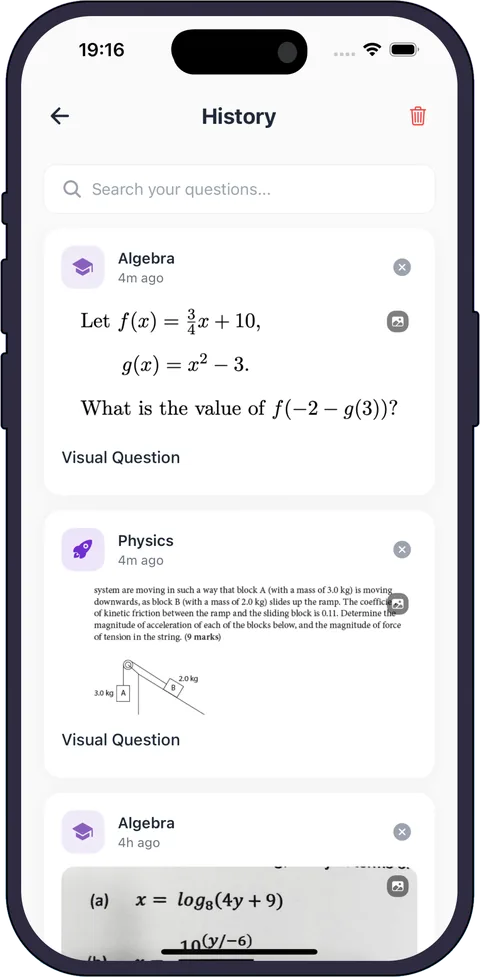
- A question history. Your hardest questions are your best revision material, so they should be saved, tagged and searchable.
- Your language. If English is not your first language, explanations in the language you think in make a big difference. Socratic Solve supports 20+ languages.
- A clear price model. You should know what is free, what costs money, and whether a subscription renews automatically before you rely on the app during exam week.
A 10-minute test before you commit to one
Marketing pages all say the same thing. A short test with your own homework tells you more:
- Pick three questions you already know the answers to: one printed, one in your own handwriting, and one from a subject other than math.
- Scan each one and check that the question the app shows matches the page exactly.
- Read the steps, not just the answer. Would they make sense to you if you had never seen the topic? Are the reasons given, or only the operations?
- Ask a follow-up or rephrase the question in your own words and see whether the explanation stays consistent.
- Check where your questions go. Can you find yesterday's question again in a few taps?
If an app fails the handwriting test or skips steps on a problem you understand, it will do worse on the ones you don't.
How to use an AI homework helper without cheating yourself
- Attempt first. Even a wrong attempt tells you which step you actually need help with.
- Read the steps, not the answer. The final line is the least valuable part of the solution.
- Find your divergence point. Compare the app's working to yours. The first line where they differ is the thing to learn today.
- Redo it cold. Close the app and solve the same problem on paper. If you can't, re-read; don't move on.
- Revise from history. Before a test, reopen your saved questions and solve them again without peeking.
Used this way, an AI helper is closer to a patient tutor than an answer key. It's the difference between checking your work and outsourcing it.
Two habits make this stick. First, explain one step out loud in your own words; if you can't, you haven't learned it yet. Second, change the numbers: invent a near-identical problem and solve it without help. Tests reuse problem types, not the exact questions, so this is the closest practice to the real thing.
What do teachers and schools think about AI homework help?
There is no single answer. Rules vary by country, school, subject and even individual assignment, and many schools are still updating their policies. In broad terms, you will usually see one of three positions:
- Not allowed for some or all graded work, especially take-home tests and essays.
- Allowed for learning, such as practice, revision and checking answers, but not for producing work you hand in.
- Allowed with disclosure, where you may use AI but must say how you used it.
The common thread is that the work you submit should show your own understanding. If the policy is unclear, ask your teacher before you use any AI tool on graded work; "I used it to check my method" is an easy conversation, and "I copied the answer" is not. The practical upside of learning from the steps: on a test there is no app, and the students who practiced the method are the ones who can do it.
What does it cost?
AI homework helpers generally use one of three price models: free with a daily or monthly limit, a set number of free credits, or a paid subscription (often with a free starting allowance). Before paying for any of them, check whether the plan renews automatically and how to cancel it in your app store account.
Socratic Solve is free to download on iPhone, iPad and Android and includes free solve credits, so you can test it on tonight's homework before deciding anything. An optional auto-renewing subscription gives you more solves when you need them. Get it on the App Store →