First, find out where the worksheet came from
Thirty seconds of detective work saves a lot of searching. Look at the header, the footer and the small print:
- A publisher or software name. Kuta Software sheets, for example, print the program name (like "Infinite Algebra 1") at the top and "Worksheet by Kuta Software LLC" at the bottom.
- A title or lesson number, like "Slope From Two Points" or "Lesson 4.2."
- A textbook page or exercise number. If the questions are copied from your textbook, the book's own answer key is the place to look.
- Nothing at all. Then your teacher probably wrote it, and no key exists online. Skip to the picture method below.
7 ways to find answers to homework worksheets
1. Check whether your teacher already shared a key
Look on your class page, in Google Classroom or your school's learning platform, and at the back of the packet. Some teachers post answer keys for practice sheets so students can check their own work. If the sheet is graded, they usually won't, and that tells you something too.
2. Check your textbook's answer key
Many textbooks print answers to some exercises at the back. OpenStax, a nonprofit at Rice University that publishes free textbooks, puts answers to odd-numbered exercises in the Answer Key of books like Calculus Volume 1. If your assignment is odd-numbered problems, you can check every one.
3. Look for the publisher's free version
Some publishers give away sample worksheets with answers. Kuta Software's free PDFs (such as "Slope From Two Points") show the questions first, then repeat the sheet with every answer filled in. If your worksheet has a publisher's name on it, check that publisher's website before searching anywhere else.
4. Search the exact wording in quotes
Google's own search help explains three operators that make worksheet searches far more precise:
- Quotes find an exact phrase:
"Slope From Two Points" answer key - site: searches one website:
site:kutasoftware.com slope - filetype:pdf finds PDF files:
"Slope From Two Points" filetype:pdf
Quote the worksheet's title or an unusual sentence from one of its questions, not just the topic. Be careful with what comes back: many results for worksheet searches are auto-generated pages that repeat the title and contain no answers. If a page doesn't show the questions from your sheet, close it, and never download a file or install anything to "unlock" an answer. Sites that promised free Chegg answers are a good example: see what happened to Homeworkify.
5. Solve the question from a photo
When there's no key, or the key doesn't match, solve the questions themselves. A homework app like Socratic Solve reads a photo of a printed or handwritten question and gives the answer with a step-by-step explanation, in math, physics, chemistry, biology, history and more. Because it works on the exact question in front of you, it helps even when no key exists, including on sheets your teacher wrote.
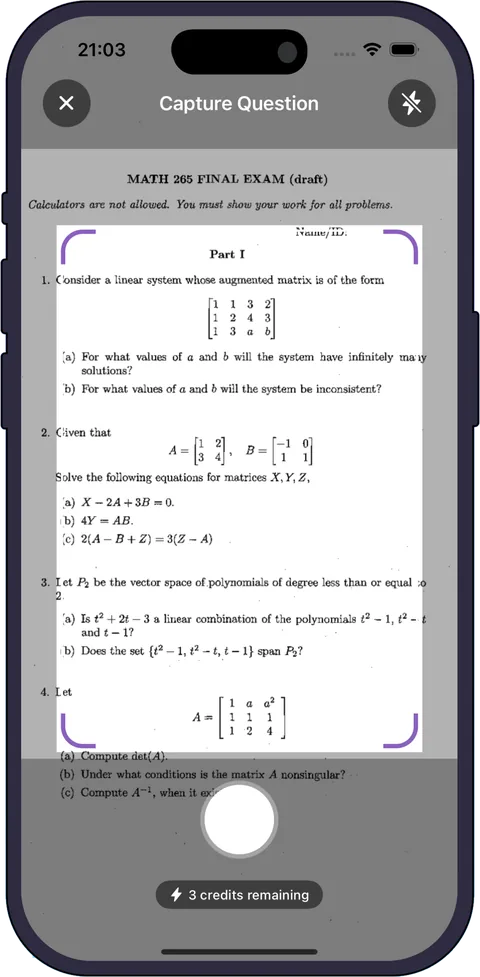
For the best results, photograph one question at a time in good light, include any diagram or table the question refers to, and keep the whole question in the frame. You can also type a question or upload a photo you already took, including a screenshot. Free credits get you started on iPhone, iPad and Android; regular use needs a subscription. Our guide to finding worksheet answers by picture covers multiple choice, fill-in-the-blank and multi-part questions.
6. Use Google Lens for a quick lookup
Google Lens, in the free Google app and in Chrome on a computer, lets you photograph a question to find explainers, videos and web results for math, history, chemistry, biology, physics and more. It's good for finding a similar worked example, though it points you to web pages rather than solving your exact question in one place.
7. Ask your teacher or a classmate
If the key doesn't match or two sources disagree, ask. A quick "is number 6 asking for the slope or the equation?" before the deadline beats a sheet of wrong answers after it.
Why the answer key you found doesn't match your worksheet
This is the most common problem, and it usually isn't your fault:
- Your teacher printed a different version. Worksheet software can create new versions of the same sheet. Kuta's Infinite programs, for example, let teachers scramble the answer choices, scramble the questions, or make completely new questions for each version. An answer key for one version is useless for another.
- A different edition of the textbook. If the key was made for another edition, problem numbers may not line up.
- A look-alike worksheet. Two sheets can share a title like "Solving Equations" and nothing else.
Before you trust any key, compare the first two questions word for word and number for number. If they don't match exactly, the key isn't for your sheet.
Check any answer before you write it down
Whether the answer came from a key, a search or an app, a 30-second check tells you if it's right. Here's a question you'd find on a typical algebra worksheet.
Question: Find the slope of the line through (2, −3) and (6, 5), then write the equation of the line.
- Slope: m = (y2 − y1) ÷ (x2 − x1) = (5 − (−3)) ÷ (6 − 2) = 8 ÷ 4 = 2.
- Intercept: put one point into y = 2x + b: −3 = 2(2) + b, so b = −7.
- Equation: y = 2x − 7.
Check: plug in both points. 2(2) − 7 = −3 and 2(6) − 7 = 5. Both match, so the answer is right.
Two common wrong answers: subtracting in different orders, (5 − (−3)) ÷ (2 − 6), gives −2. Dropping the negative sign, (5 − 3) ÷ (6 − 2), gives 1/2. Neither line passes through both points, and the check catches both mistakes in seconds. If an answer key says −2, the key is wrong (or it's for a different version). For a full routine, see our guide on how to check your homework answers.
Is it cheating to look up worksheet answers?
It depends on how you use them. Checking answers after you've done the work, or reading the steps for a question you're stuck on and then solving the next one yourself, is studying. Copying answers into a graded worksheet usually breaks school rules, and it leaves you stuck on the test, where there's no key. Follow your school's academic integrity policy, and when in doubt, ask your teacher whether checking with an app or key is allowed.
Try Socratic Solve free
Snap a worksheet question and get the answer with every step explained. Free credits to start on iPhone, iPad and Android.